Many small business owners rely on WhatsApp Business to communicate with customers, manage inquiries, and build trust through fast responses. If you’re using a Huawei Mate phone, you may wonder whether WhatsApp Business works properly without Google Mobile Services. The good news is that Huawei devices are fully capable of running WhatsApp Business with the right setup. Understanding how it works and what to expect helps you use the app smoothly and confidently for daily business communication.
Using WhatsApp Business on Huawei Mate Phones: What You Need to Know
WhatsApp Business is designed to work independently of Google Play services, which makes it good for Huawei Mate phones. However, a few system details and setup steps are important for achieving the best experience.
WhatsApp Business Compatibility on Huawei Mate Devices
WhatsApp Business can run on most modern Huawei Mate phones, including models running EMUI 14 or HarmonyOS 4 and later. Because the app does not rely heavily on Google Play Services, core functions such as messaging, calling, media sharing, and customer replies work normally. This makes Huawei Mate phones a practical choice for entrepreneurs, freelancers, and small businesses that depend on WhatsApp Business for daily operations.


How to Install WhatsApp Business Correctly
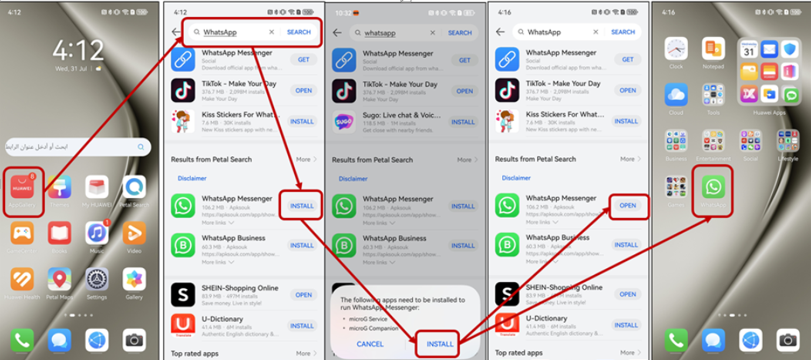
The easiest way to install huawei whatsapp for business on your Huawei Mate is through AppGallery. Simply search for “WhatsApp Business” and tap install. During the first installation, your device may prompt you to allow MicroG services. These services help support notifications and background messaging, ensuring you don’t miss customer messages. Once installation is complete, open the app and proceed with account setup as usual.
Account Setup and Phone Number Verification
Setting up WhatsApp Business on Huawei Mate phones follows the same process as on other Android devices. You’ll need a valid phone number that is not already linked to a personal WhatsApp account. Verification codes are sent via SMS or voice call, and once confirmed, your business profile becomes active. Features like business hours, catalog creation, and automated greetings are available without restrictions.
Notifications and Background Performance
One area that can affect WhatsApp Business performance on Huawei Mate phones is battery optimization. Huawei’s smart power management may limit background activity, which can delay notifications. To avoid this, go to Settings > Battery > App Launch, locate WhatsApp Business, and disable automatic management. Allowing the app to run freely in the background ensures instant alerts when customers message you.
Using Business Tools and Features
All major WhatsApp Business tools function normally on Huawei Mate phones. You can create a business profile with address, website, and description, set automated away messages, quick replies, and greeting messages, and manage product catalogs. These features are handled within the app itself and do not depend on Google services, making them fully accessible on Huawei devices.
Data Backup and Chat History Considerations
Unlike standard Android phones, Huawei Mate devices cannot use Google Drive for chat backups. Instead, WhatsApp Business allows local backups stored on your phone’s internal storage. You can also manually export chat histories if needed. While this requires a bit more manual management, it ensures your business conversations remain secure and accessible.
See also: Why Attic Mold Removal Requires Specialized Techniques
Security, Stability, and Updates
WhatsApp Business on Huawei Mate phones receives regular updates through AppGallery, ensuring security patches and new features arrive on time. As long as your device system is up to date, the app remains stable and secure. Huawei’s system-level security and app permissions further help protect sensitive business communications.
Conclusion
So, WhatsApp Business can run smoothly on Huawei Mate phones with the right setup. From installation to daily customer communication, the app delivers reliable performance without requiring Google Play services. By managing battery settings, keeping the app updated, and understanding backup limitations, business owners can confidently use WhatsApp Business on Huawei Mate devices to stay connected, professional, and responsive in today’s fast-moving digital marketplace.